
-- Brains of the Modern Ham Shack
For decades, the "shack computer" was often a noisy, power-hungry PC tucked under the desk, primarily used for logging or basic digital modes. The arrival of the Raspberry Pi 5 changes the game, offering hams a silent, industrial-grade powerhouse that fits in the palm of your hand. Unlike a standard Windows PC, the Pi 5 excels at multitasking without compromise.
Real-Time Audio DSP: The "Studio" in your Shack
While many hams use the Raspberry Pi for low-bandwidth digital modes like FT8, the Raspberry Pi 5 provides enough processing overhead to also act as a professional-grade Audio DSP (Digital Signal Processor). By utilizing the KXStudio repositories, we are essentially turning the Pi into a virtual rack of studio equipment.
Using tools like EasyEffects and Guitarix, you can apply real-time parametric equalization, compression, and noise gating to your transmit audio. This allows you to achieve that sought-after "Broadcast Quality" sound—warm, punchy, and clear—without the need for expensive external hardware racks. Because the Pi 5 handles this processing with extremely low latency, your monitor audio remains crisp and perfectly synced with your speech, providing professional "Voice-Over" quality transmit audio experience every time you key the mic.
Capabilities include:
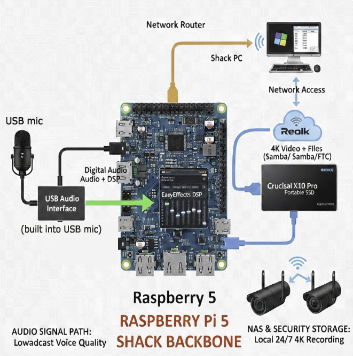
- Audio DSP: Real-time "Broadcast Voice" processing using EasyEffects/Guitarix.
- Surveillance NAS: High-speed 1TB SSD storage for 24/7 Reolink camera recording.
- Station Server: SMB/FTP file sharing to your Windows 11 shack PC.
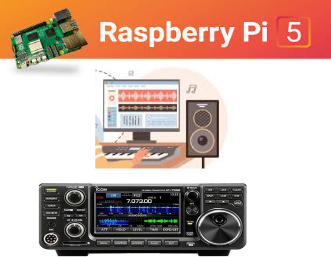 The remainder of this page is designed to help "getting started" hams to leverage the Pi's unique architecture to solve two common shack challenges: achieving that warm, professional "Voice Over" sound on the air and maintaining a secure, localized storage system for surveillance. By moving these tasks to a dedicated Pi, you eliminate the "hiccups" and latency often caused by Windows background updates, ensuring your station remains responsive, quiet, and incredibly efficient. Whether you are chasing DX or securing your perimeter, this "Small Board" approach provides a level of stability and customization that traditional computers simply can’t match.
Why and how to use raspberry pi 5 for audio processing
The Raspberry Pi 5 is a powerful platform for audio processing due to its significant CPU performance leap, improved data bandwidth, and versatile expansion options like PCIe. While it lacks a built-in analog jack, its architecture is better suited for high-fidelity, multi-channel, and real-time audio tasks than its predecessors.
Note: K4QKY used Google Gemini as his assistant to the prepare the Pi to integrate with his radio station including generation of the command lines below. He ran the Pi's in split screen to cut commands from gemni and past into Pi's command line terminal. You can also use it for other exciting ham radio and other projects. Gemini Rocks!
Core Installation Commands for Pi's command line terminal
1. System Prep & Audio Repositories
sudo apt update && sudo apt upgrade -y
wget https://launchpad.net/~kxstudio-debian/+archive/kxstudio/+files/kxstudio-repos_11.2.0_all.deb sudo dpkg -i kxstudio-repos_11.2.0_all.deb
sudo apt update
2. Install Audio DSP & Processing Tools
sudo apt install carla-git guitarix -y
sudo apt install flatpak -y
flatpak remote-add --if-not-exists flathub
https://flathub.org/repo/flathub.flatpakrepo flatpak install flathub com.github.wwmm.easyeffects -y
3. Driver & Permission Fixes
sudo apt remove brltty -y
sudo usermod -a -G dialout $USER
4. Initialize 1TB Storage (SSD) (if you have one)
sudo mkfs.ext4 /dev/sda1 sudo mkdir /media/nas sudo mount /dev/sda1 /media/nas sudo chown -R pi:pi /media/nas sudo blkid /dev/sda1
echo "UUID=$(sudo blkid -s UUID -o value /dev/sda1) /media/nas ext4 defaults,nofail 0 2" | sudo tee -a /etc/fstab
5. Network Sharing (Samba & FTP)
sudo apt install samba vsftpd -y
echo -e "[Shack-Storage]\n path = /media/nas\n writeable = Yes\n public = no" | sudo tee -a /etc/samba/smb.conf
sudo smbpasswd -a pi
sudo sed -i 's/#write_enable=YES/write_enable=YES/' /etc/vsftpd.conf
echo "local_root=/media/nas" | sudo tee -a /etc/vsftpd.conf
sudo systemctl restart smbd vsftpd
Note: "Unlike Windows, the Raspberry Pi 5 recognizes the Silicon Labs CP210x bridge natively. No manual driver installation is required; the OS simply 'sees' the radio the moment you plug it in."
6. Diagram
Troubleshooting & Diagnostics
- Check Radio Connection: dmesg | grep cp210x
- List Audio Devices: aplay -l
- Check USB Bus Speed: lsusb -t
- Verify Drive Speed: sudo hdparm -t --direct /dev/sda1